Deep Search in OPAL: Find Any Oracle Fusion API Field, Finder or Parameter in One Search
Oracle Fusion has thousands of REST endpoints. The question you usually have is not “what is the endpoint called?” but “where does this field live?” — which resources return it, which ones let you filter on it, which finder takes it, and where you can write it.
The endpoint name rarely tells you. ReligionId is not in the path /workers. PersonNumber is a variable inside a finder, a q field, and a response field, all on different endpoints.
OPAL’s new Deep Search answers that in one search.
What Deep Search looks inside
The normal sidebar filter in OPAL searches endpoint paths and summaries. Deep Search goes further. For every endpoint in your catalog it searches:
- the path and description
- every q field (what you can filter on with
q=) - every finder — its name, its variables and its description
- every path, query and header parameter
- every request body field (what you can send)
- every response field (what comes back)
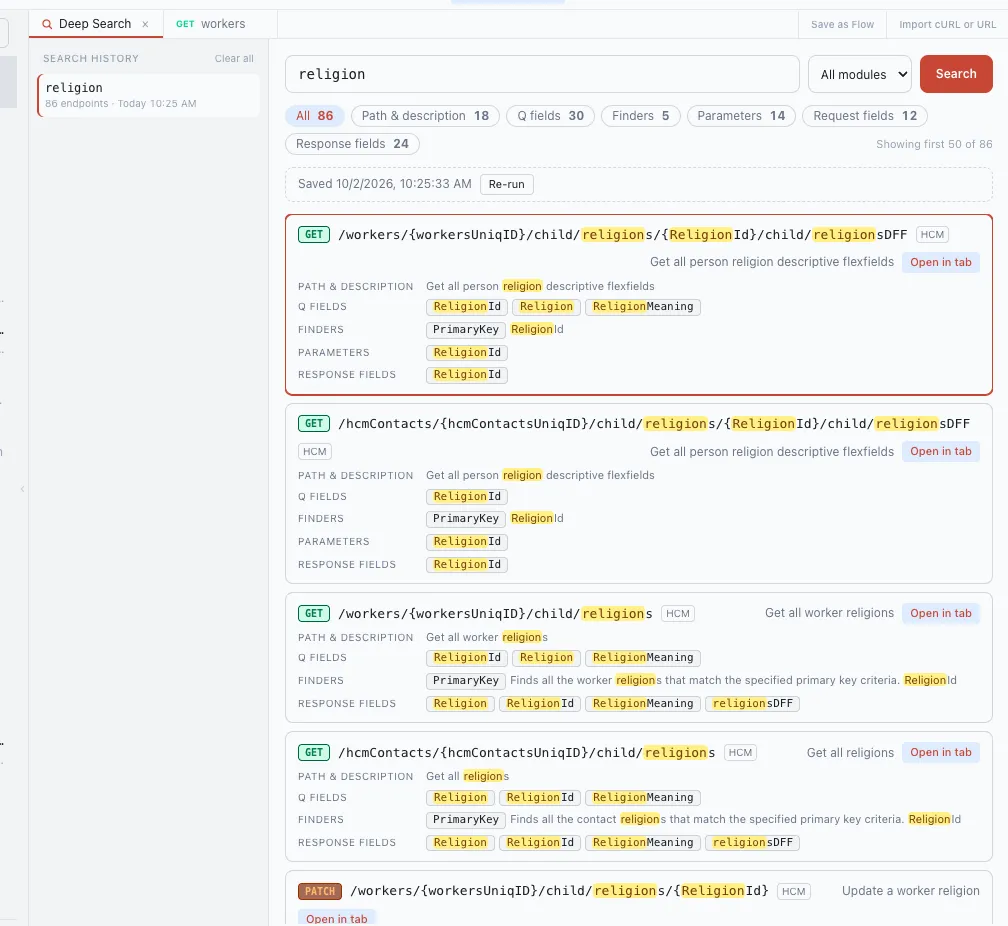
Each result shows the endpoint once, with a line per place the term matched and the term highlighted. You can see at a glance whether a field is only returned, or also filterable, or also writable.
Example: where is Religion?
Searching religion in my workspace found 86 endpoints:
| Matched in | Endpoints |
|---|---|
| Path & description | 18 |
| Q fields | 30 |
| Finders | 5 |
| Parameters | 14 |
| Request fields | 12 |
| Response fields | 24 |
(An endpoint can match in more than one place, so the rows add up to more than 86.)
The first results tell the story:
GET /workers/{workersUniqID}/child/religions—Religion,ReligionIdandReligionMeaningare q fields and response fields, and thePrimaryKeyfinder takesReligionId.GET /hcmContacts/{hcmContactsUniqID}/child/religions— the same fields on contacts, not workers.PATCH /workers/{workersUniqID}/child/religions/{ReligionId}— where you update it..../child/religionsDFF— the descriptive flexfields hanging off the religion record.
That is the difference between “I found an endpoint” and “I know which endpoint to read from, which one to filter on, and which one to write to.”
Search also matches word forms and parts of field names: religion finds religions in paths and ReligionId in field names.
Filter the results
Above the results there is a chip for each kind of match — Q fields, Finders, Parameters, Request fields, Response fields — with its count. Click Q fields and you only see endpoints where you can actually filter on the term. Pick a module (HCM, FSCM, CRM…) to narrow it further.
Open the result ready to use
Click Open in tab and the endpoint opens in a request tab.
Click a q field in a result and the endpoint opens on the Q Builder with that field already in the first condition — type the value and send. Click a finder and it opens on the Finder tab with that finder selected and its variables ready to fill.
Every search is kept
Each search you run is saved in the history on the left: the query, the filters, the result count, the time, and the results as they were at that moment.
- Click an old search to see its saved results instantly, without running it again.
- Click Re-run to search again — OPAL tells you what is new and what is gone since the saved run. Useful after a sync or an Oracle quarterly update.
- Delete one entry, or clear them all.
Fast, and offline
Deep Search runs on OPAL’s local catalog — the bundled Oracle specs, or the specs synced from your own instance. Nothing leaves your machine, and it works with no connection to Oracle at all.
On the full bundled catalog (about 36,000 endpoints) the first page of results comes back in well under a tenth of a second.
Open it from the Deep Search button in the top bar, or with Ctrl+Shift+D (Cmd+Shift+D on Mac).
When you can use it
Deep Search ships in OPAL v1.11.0. Get it from the download page, which always has the latest version.
Explore Oracle Fusion APIs offline
OPAL bundles 59,000+ Oracle Fusion REST endpoints, fully searchable offline, with a visual Q Builder and Finder Builder that only offer fields the endpoint actually accepts — so your filter can't 400.
Free, no account required. Pro adds live requests and multi-step Flows.